BPMN Script Tasks
An executable BPMN diagram can contain Script Tasks. In PROCEED, you can use Blockly or pure JavaScript (JS) to create an executable Script Task. The programming in Blockly is limited to the usage of the predefined blocks which resemble many JavaScript possibilities. The programming in JavaScript is more versatile but — compared to Blockly — for advanced Users.
The code of a script task is executed within a sandboxed JavaScript environment, so that it is not able to influence the PROCEED Engine, the Operation System or other process instances.
The following page describes the available JavaScript possibilities and libraries usable in Script Tasks.
JavaScript and PROCEED Libraries
A Script Task can be defined with pure JavaScript. Currently PROCEED supports the ECMAScript 2020 version. Moreover, there are several library functions that can be used for accessing global data, process variables or to trigger network requests.
Ending Scripts: optional return and Error
Scripts can end without a return statement.
Optionally, it can also end with return.
In this case, you should only return an Object.
Its properties (key and value) will write and update the process variables.
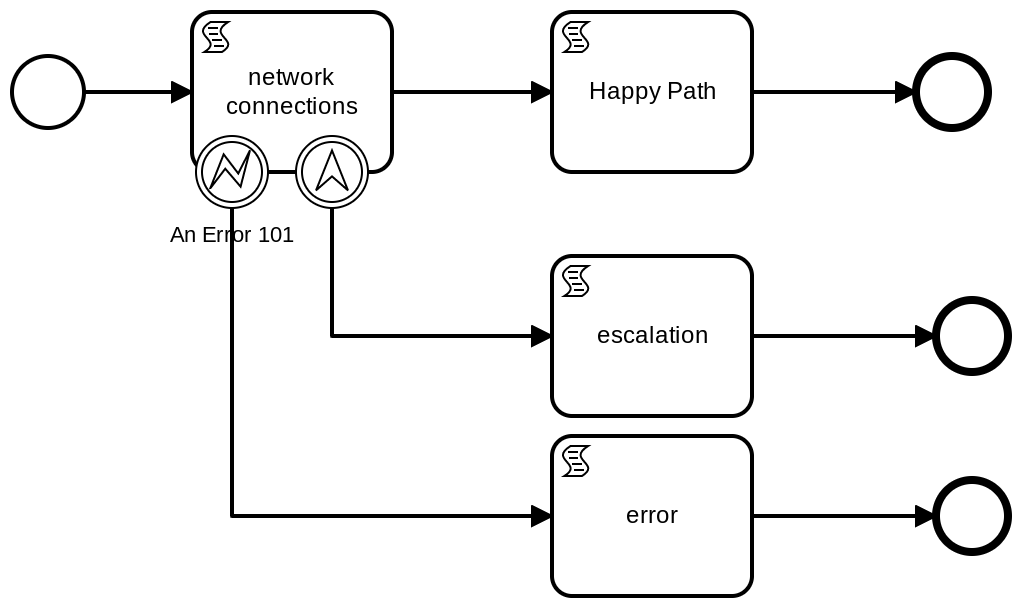
A Script Task can also end by a semantic error, which will be
caught by an attached boundary Error or Escalation event. This is done by
throwing an BpmnError or an BpmnEscalation.
If an error is thrown but not caught within the BPMN process, or if the script itself has an error (e.g. syntax error), the token will end its execution. (This only stops the running token, not the whole process.)
Example
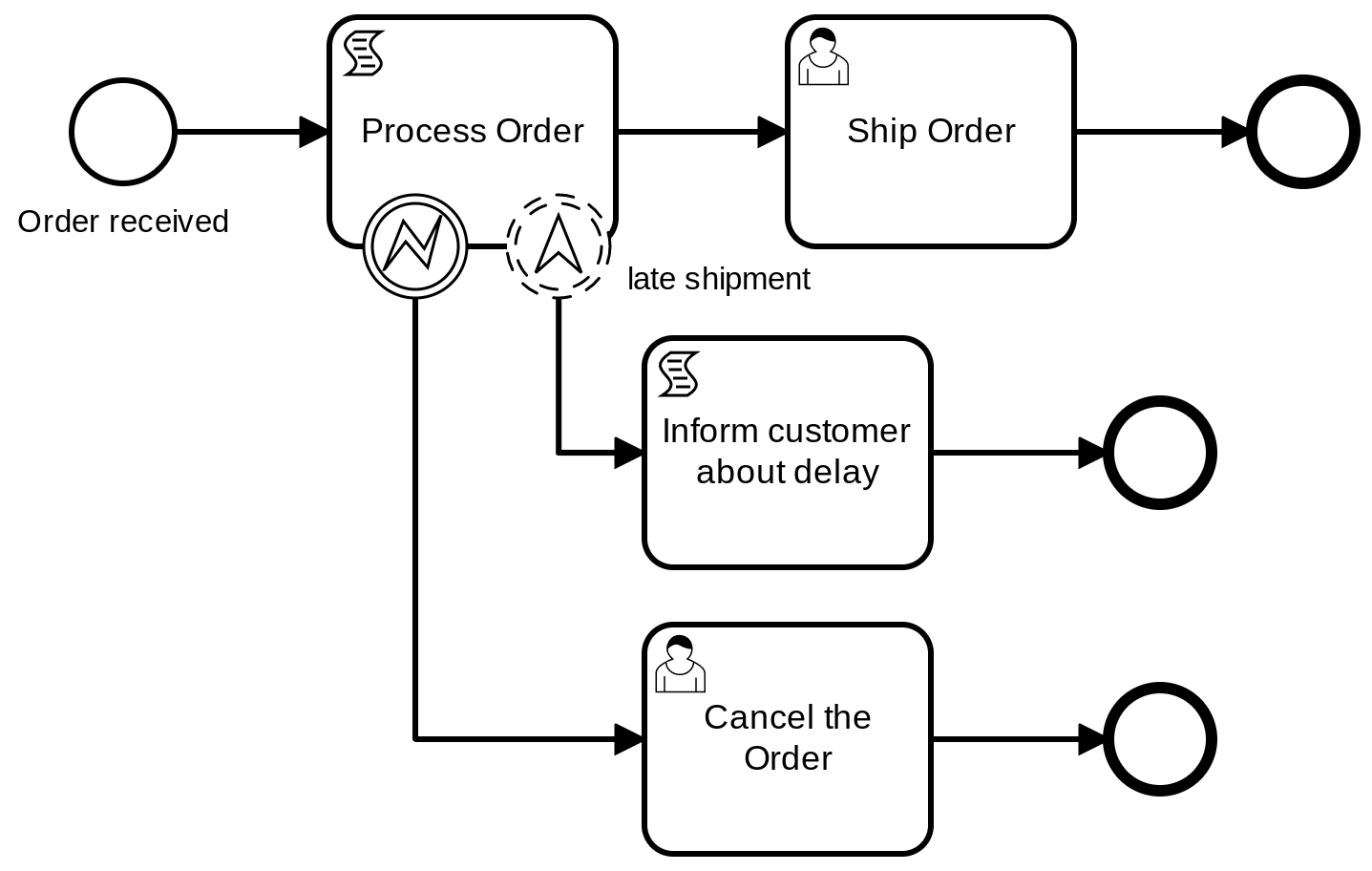
The following example is a BPMN process describing the workflow of an online shop which offers to ship products to their customers: The process starts with a received order, then the order gets processed and finally shipped to a customer.
Using the attached boundary elements Error and Escalation, the process can handle exceptional behavior when processing the order: If there is an escalation triggered because of an unusual high amount of ordered products, the customer will be informed of a late shipment. If there occurs an error while processing, the customer is informed that the order got canceled.
Example Script Code
const amount = variable.get('amount'); // amount of the ordered products
const cost = variable.get('cost'); // cost of the ordered products

if (cost < 50) {
  // update the costs
  try {
    // add shipping costs to total cost
    variable.set('cost', cost + 5);
  } catch (err) {
    log.info('Error occured while processing order: ' + err);
    throw new BpmnError('A severe error occured while processing');
  }
}

if (amount > 100) {
  // execute alternative flow to the attached escalation boundary-event
  throw new BpmnEscalation('late shipment', 'The order is too much');
}
PROCEED Library: Script API
variable
In a Script Task it is possible to read and modify data of the process.
This can be done with the object variable.
It is recommended to predefine process variables in the Automation tab of the Property Panel before using them inside a Script Task.
Of course, it is also possible to use JS’ capability to define variables with let, const, var. These variables are
only local to the Script Task and will be deleted after its execution.
When setting process variables, use the serializable JSON data types: string, number, boolean, object, array.
Functions or cyclical objects are automatically converted to undefined.
Process variables usually exist in two different scopes: inside the Script Task (local) and outside the Script Task on the level of the entire process. At the start of each Script Task, the process variables are once copied into the local scope of the task. After the Script Task execution ended, the local process variables automatically update (override) the process variables outside of the task.
Although we recommend to usually read and write in the local scope, there are also methods for accessing the outside scope. But keep in mind that writing into the outside scope can lead to concurrency problem if other (parallel) tasks also write into these process variables at the same time.
| API | Access to the process variables. |
|---|---|
.get( "<var-name>" ) | Returns the value of a variable from the local scope. |
.getGlobal( "<var-name>" ) | Returns the value of a variable from the global scope. |
.getAll() | Returns an object containing all local variables and their values. |
.getAllGlobal() | Returns an object containing all global variables and their values. |
.getWithLogs() | Returns an object containing all local variables, their values and their log (array) about the modification time points. |
.getWithLogsGlobal() | Returns an object containing all global variables, their values and their log (array) about the modification time points plus the modifier. |
.set( "<var-name>", <var-value> ) | Updates the value of a local variable. |
.setGlobal( "<var-name>", <var-value> ) | Updates the value of a global process variable. |
Example Code
log.info("\nget('var1'): " + variable.get('var1'));
log.info("\ngetGlobal('var1'): " + variable.getGlobal('var1'));
log.info('\ngetAll(): ' + JSON.stringify(variable.getAll(), null, 2));
log.info('\ngetAllGlobal(): ' + JSON.stringify(variable.getAllGlobal(), null, 2));
log.info('\ngetWithLogs(): ' + JSON.stringify(variable.getWithLogs(), null, 2));
log.info('\ngetWithLogsGlobal(): ' + JSON.stringify(variable.getWithLogsGlobal(), null, 2));

variable.set('var1', 123);

log.info("\nget('var1'): " + variable.get('var1'));
log.info("\ngetGlobal('var1'): " + variable.getGlobal('var1'));
log.info('\ngetAll(): ' + JSON.stringify(variable.getAll(), null, 2));
log.info('\ngetAllGlobal(): ' + JSON.stringify(variable.getAllGlobal(), null, 2));
log.info('\ngetWithLogs(): ' + JSON.stringify(variable.getWithLogs(), null, 2));
log.info('\ngetWithLogsGlobal(): ' + JSON.stringify(variable.getWithLogsGlobal(), null, 2));

variable.setGlobal('var1', 456);

log.info("\nget('var1'): " + variable.get('var1'));
log.info("\ngetGlobal('var1'): " + variable.getGlobal('var1'));
log.info('\ngetAll(): ' + JSON.stringify(variable.getAll(), null, 2));
log.info('\ngetAllGlobal(): ' + JSON.stringify(variable.getAllGlobal(), null, 2));
log.info('\ngetWithLogs(): ' + JSON.stringify(variable.getWithLogs(), null, 2));
log.info('\ngetWithLogsGlobal(): ' + JSON.stringify(variable.getWithLogsGlobal(), null, 2));
log
Logging in the PROCEED Engine can be done via the object log. Depending on the
log level and the Engine configuration, the logged message will maybe shown in
the console.
| API | Write a message to the logging system of the Engine. |
|---|---|
.trace( "<message>" ) | Logging with timestamp in log level trace (deactivated by default) |
.debug( "<message>" ) | Logging with timestamp in log level debug (deactivated by default) |
.info( "<message>" ) | Logging with timestamp in log level info |
.warn( "<message>" ) | Logging with timestamp in log level warn |
.error( "<message>" ) | Logging with timestamp in log level error |
Example Code
log.trace('Hello PROCEED - trace()');
log.debug('Hello PROCEED - debug()');
log.info('Hello PROCEED - info()');
log.warn('Hello PROCEED - warn()');
log.error('Hello PROCEED - error()');
console
Logging can also done via the object console.
Using this way, the message will be redirected to the logging system of the engine and is essentially nearly the same as the logging functions.
console just supports a few other functions:
| API | Write a message to the logging system of the Engine. |
|---|---|
.log( "<message>" ) | Logging without timestamp. |
.trace( "<message>" ) | Logging with timestamp in log level trace (deactivated by default) |
.debug( "<message>" ) | Logging with timestamp in log level debug (deactivated by default) |
.info( "<message>" ) | Logging with timestamp in log level info |
.warn( "<message>" ) | Logging with timestamp in log level warn |
.error( "<message>" ) | Logging with timestamp in log level error |
.time( "<label>" ) | Starts a timer containing label parameter |
.timeEnd( "<label>" ) | Ends a timer with given label parameter and displays the result in console |
Example Code
console.time('L1');
console.log('Hello PROCEED - log()');
console.trace('Hello PROCEED - trace()');
console.debug('Hello PROCEED - debug()');
console.info('Hello PROCEED - info()');
console.warn('Hello PROCEED - warn()');
console.error('Hello PROCEED - error()');
console.timeEnd('L1');
wait( <ms> )
A timeout function which pauses/postpones the script execution.
It is synchronous and blocks the execution until the timeout is passed.
Hint: the popular setTimeout() is not available in a Script Task.
If the entire process is paused from the Management System, all script code is also paused until the process is resumed.
If a pause occurs during a wait(), the system stores the original expiration time of wait().
If the process resumes before this original expiration time, the script waits for the remaining time before continuing with the next instructions.
If the original expiration time has passed after the process resumes, it immediately continues with the next instructions after wait().
| API | |
|---|---|
wait(<milliseconds: number>) | milliseconds for pausing the the Script Task execution |
Example Code
// log with time:
log.info("Before wait()");
wait(10000); // 10s
log.info("After wait()");
waitAsync( <ms> ): Promise
The use of waitAsync( <ms> ): Promise is only suitable for advanced users.
It makes code execution asynchronous.
This allows you to achieve multiple semi-parallel code executions.
Like wait() but asynchronous. So, it immediately continues with the next code instructions and does not block the execution.
In this sense, it is similar to the usual setTimeout() but instead of callbacks, it returns a Promise.
Therefore, you can use await or then().
Pausing behavior is the same as for wait().
| API | |
|---|---|
waitAsync(<milliseconds: number>): Promise | milliseconds for pausing the the Script Task execution. Returns a Promise. |
Example Code
waitAsync(10000).then( () => console.info("Finished waiting 10s") );setInterval( <clb>, <ms> ) and clearInterval( <id> )
An interval function which repeatedly calls a callback function (clb) after a timeout (ms).
It is similar to the conventional setInterval() of the Node.js and the Web API.
Hint: the interval timer starts counting after the last interval execution has ended.
The setInterval() function returns an id that is used to stop the interval with clearInterval( <id> ).
A Script Task can only end when all started intervals have finished.
setInterval() is synchronous, i.e. if multiple intervals have been started, one interval execution
blocks other the code execution of other intervals.
If you need to run parallel code executions, you currently have to use multiple Script Tasks connected by a parallel Gateway.
| API | |
|---|---|
setInterval(<clb: function>, <milliseconds: number>): <id: number> | the clb function is repeatly called after the given interval timeout milliseconds ended. Return the id of the interval timer. |
clearInterval( <id: number> ) | stops the interval timer. |
Example Code
let id;
let counter;

let f = function (intervalId, startValue) {
    counter = counter ?? startValue ?? 0;
    counter++;
    log.info('Interval-Id: ' + intervalId + ' Counter: ' + counter);
    if (counter > 5) {
        log.info('Cancel Interval-Id: ' + intervalId);
        clearInterval(intervalId);
    }
};

/*
Calling setInterval() with a callback function and timeout.
You can directly have function f as the first parameter.
In this case, we put f into another arrow function, because
id1 is used as the first parameter of f().
*/
id = setInterval(() => f(id, 2), 1000);
HTTP Network Requests and Server
networkRequest: sychronous functions
Inside of a Script Task it is possible to send HTTP(S) requests to a given URL.
The prefered way of using networkRequest is with its synchronous methods, i.e. the functions wait until an answer is is received.
Since this are network requests, the completion of the methods sometimes need a while until the response is received.
If the entire process is paused from the Management System, all script code is also paused until the process is resumed. If a pause occurs during a networkRequest.X(), the system stores the response and returns it when the process is resumed.
| API | |
|---|---|
.get( "<url>", [<{options}>]): { response, body } | Sends a GET-Request to a URL |
.post( "<url>", <{body}>, ["<content-type>"], [<{options}>]): { response, body } | Sends a POST-Request to a URL with a body (Object or String) |
.put( "<url>", <{body}>, ["<content-type>"], [<{options}>]): { response, body } | Sends PUT-Request to URL with a body (Object or String) |
.delete( "<url>", [<{options}>]): { response, body } | Sends a DELETE-Request to a URL |
.head( "<url>", [<{options}>]): { response, body } | Sends a HEAD-Request to a URL |
"<url>" is a required parameter defining the endpoint of the network request.
It has the format: <protocol>://[<user>:<password>@]<address>:[<port>]/[<path>]?[<query>]
<protocol>: required, needs to behttporhttps.[<user>:<password>@]: optional, used for Basic HTTP authentification (Base64 encoding intoAuthorization:header)<address>is required and needs to be a DNS domain name or an IP address.[<port>]and[<path>]and[<query>]are optional.- Example:
"https://user:pass@app.example.com:8000/path/to/resource?compressed=true&limit=10"
The ["<content-type>"] is an optional string parameter. Set it to the correct Mime
type
of the transmitted data. It defaults to "text/plain" if body is a string, and
to "application/json" if body is a JS object (because it will automatically be
transformed to JSON before sending).
The [<{options}>] object is optional.
For unsecured HTTP requests, there are two usable properties:
headers: {}: An object of strings containing additional request headers.setHost: true|false: Specifies whether or not to automatically add theHostheader. Defaults totrue.
In case of a secure HTTPS connection, the options object has some additional attributes from https.request.
The network functions only return if the response has a HTTP 2xx status code. The methods return an object that contains two properties: { response, body }
response: is an object that contains meta information about the response. It includes the following properties:.rawHeaders,.rawTrailers,.httpVersionMajor,.httpVersionMinor,httpVersion,.method,.statusCode,.statusMessage,.url,.complete,.aborted,.upgradebody: Body of the response
The functions throw an Error if:
- if the response has a non-2xx statusCode:
{ response, body }will be returned inside theErrorobject - if any error is encountered during the request (e.g. DNS resolution, TCP level errors, or actual HTTP parse errors)
That’s why try-catch must be used around network requests.
Example Code
try {
  let { response, body } = networkRequest.put(
    'https://localhost:8080/path/to/resource?compressed=true&limit=10',
    {
      api: '2.0',
      data: 'Test data',
      id: 1,
    },
    undefined,
    {
      headers: {
        'X-PROCEED-Example-Header': '33029',
      },
      rejectUnauthorized: false,
    },
  );

  log.info(JSON.stringify(response, null, 2));
  log.info(JSON.stringify(body, null, 2));
} catch (e) {
  log.error('-----------PROBLEM------------');
  log.error(JSON.stringify(e, null, 2));
}networkRequest: asychronous functions
The use of the asynchronous networkRequest.X() functions is only suitable for advanced users.
It makes code execution asynchronous.
This allows you to achieve multiple semi-parallel code executions.
Like the synchronous networkRequest.X() functions but asynchronous. So, it immediately continues with the next code instructions and does not block the execution.
The functions return a Promise with { response, body} object.
Therefore, you can use await, then(), catch() or finally().
Pausing behavior is the same as for networkRequest.X().
| API | |
|---|---|
.getAsync( "<url>", [<{options}>]): Promise<{ response, body }> | Sends a GET-Request to a URL |
.postAsync( "<url>", <{body}>, ["<content-type>"], [<{options}>]): Promise<{ response, body }> | Sends a POST-Request to a URL with a body (Object or String) |
.putAsync( "<url>", <{body}>, ["<content-type>"], [<{options}>]): Promise<{ response, body }> | Sends PUT-Request to URL with a body (Object or String) |
.deleteAsync( "<url>", [<{options}>]): Promise<{ response, body }> | Sends a DELETE-Request to a URL |
.headAsync( "<url>", [<{options}>]): Promise<{ response, body }> | Sends a HEAD-Request to a URL |
Example Code
networkRequest.getAsync(
    'https://www.proceed-labs.org/',
    {
        headers: {
            'user-agent': 'PROCEED-ENGINE/1.0.0'
        },
        rejectUnauthorized: true,
    },
).then(
    ({ response, body }) => {
        console.info("Request successful: " + body.slice(-7));
        console.log(response);
    }
).catch(({ response, body }) => {
    console.info("Request NOT successful: " + body.slice(-7));
    console.log(response);
}).finally(() => {
    console.info("\n\nRequest FINAL\n\n");
});networkServer: create a listening HTTP Server
TODO
| API | |
|---|---|
.get( "path" ): { req, res } | TODO |
.post( "path" ): { req, res } | TODO |
.put( "path" ): { req, res } | TODO |
.delete( "path" ): { req, res } | TODO |
.getAsync( "path" ): Promise<{ req, res }> | TODO |
.postAsync( "path" ): Promise<{ req, res }> | TODO |
.putAsync( "path" ): Promise<{ req, res }> | TODO |
.deleteAsync( "path" ): Promise<{ req, res }> | TODO |
.get( "path", [<clb()>] ): void | TODO |
.post( "path", [<clb()>] ): void | TODO |
.put( "path", [<clb()>] ): void | TODO |
.delete( "path", [<clb()>] ): void | TODO |
.close(): void | TODO |
Example Code
Trigger Events
throw new BpmnError( ["<reference>",] "explanation" )
| API | Send network requests |
|---|---|
'reference' | Optional, a String that is matched to the corresponding errorCode of the error element (prio 1) or to the name attribute of the attached BPMN boundary error event (prio 2). If there is no match but an attached event without a name, then the flow is given to this Event. See Error and Escalation Event description |
'explanation' | A String that is stored in the logging system of the Engine. |
throw new BpmnEscalation( ["<reference>",] "explanation" );
| API | Send network requests |
|---|---|
'reference' | Optional, a String that is matched to the corresponding escalationCode of the escalation element (prio 1) or to the name attribute of the attached BPMN boundary escalation event (prio 2). If there is no match but an attached event without a name, then the flow is given to this Event. See Error and Escalation Event description |
'explanation' | A String that is stored in the logging system of the Engine. |
Example
const capabilities = getService('capabilities');
const network = getService('network');

await setTimeoutAsync(() => {
  log.info('Script started with a short delay');
}, 5000);

const amount = variable.get('amount');
log.info("The value of the process variable 'amount' is: " + amount);
if (typeof amount === 'number') {
  variable.set('amount', ++amount);
  log.info("Increased variable 'amount' by 1");
} else {
  variable.set('amount', 1);
  log.info("Set variable 'amount' to 1");
}

// send get-request using given url and store response body in variable
try {
  const { response, body } = await network.get('http://localhost:33029/status');
  log.debug(`Successful GET request with response: ${response.statusCode}`);
  log.info(`Engine Status is: ${body}`);
  variable.set('requestedData', body);
} catch (error) {
  if (error.response) {
    log.error('GET Response was not successful. Status Code: ' + error.response.statusCode);
  } else {
    log.error('An error occured in the GET request: ' + error.message);
  }
}

// set current progress of script task to 50%
setProgress(50);

// send put-request using given url and data
const exampleText = '<task>A Simple XML element</task>';
try {
  const { response, body } = await network.put(
    'https://httpbin.org/anything',
    exampleText,
    'text/xml',
    {
      headers: {
        'My-New-Header': 'Sent from PROCEED',
      },
    },
  );
  log.debug(`Successful PUT request with response code: ${response.statusCode}`);
  log.debug(`Successful PUT request with response body: ${body}`);
} catch (error) {
  if (error.response) {
    log.error('PUT Response was not successful. Status Code: ' + error.response.statusCode);
    throw new BpmnEscalation('BAD CODE given back');
  } else {
    log.error('An error occured in the PUT request: ' + error.message);
    throw new BpmnError('An Error 101', 'It seems there is no Server');
  }
}

// check if service is available, return true if so
function checkState() {
  const { response, body } = await network.get('https://exampleservice.org/status');

  if (body.available) {
    log.info('Service is available!');
    return true;
  } else {
    log.info('Service is not available! Test again');
    return false;
  }
}

// request service status every second, end interval if service is available
try {
  await setIntervalAsync(checkState, 1000);
  log.info('Service is available');
} catch (error) {
  if (error.response) {
    log.error('GET Response was not successful. Status Code: ' + error.response.statusCode);
  } else {
    log.error('An error occured in the GET request: ' + error.message);
  }
}

const image = await capabilities.startCapability('takePhoto');

log.info('Photo taken');

// set variable with new value
return { photo: image };